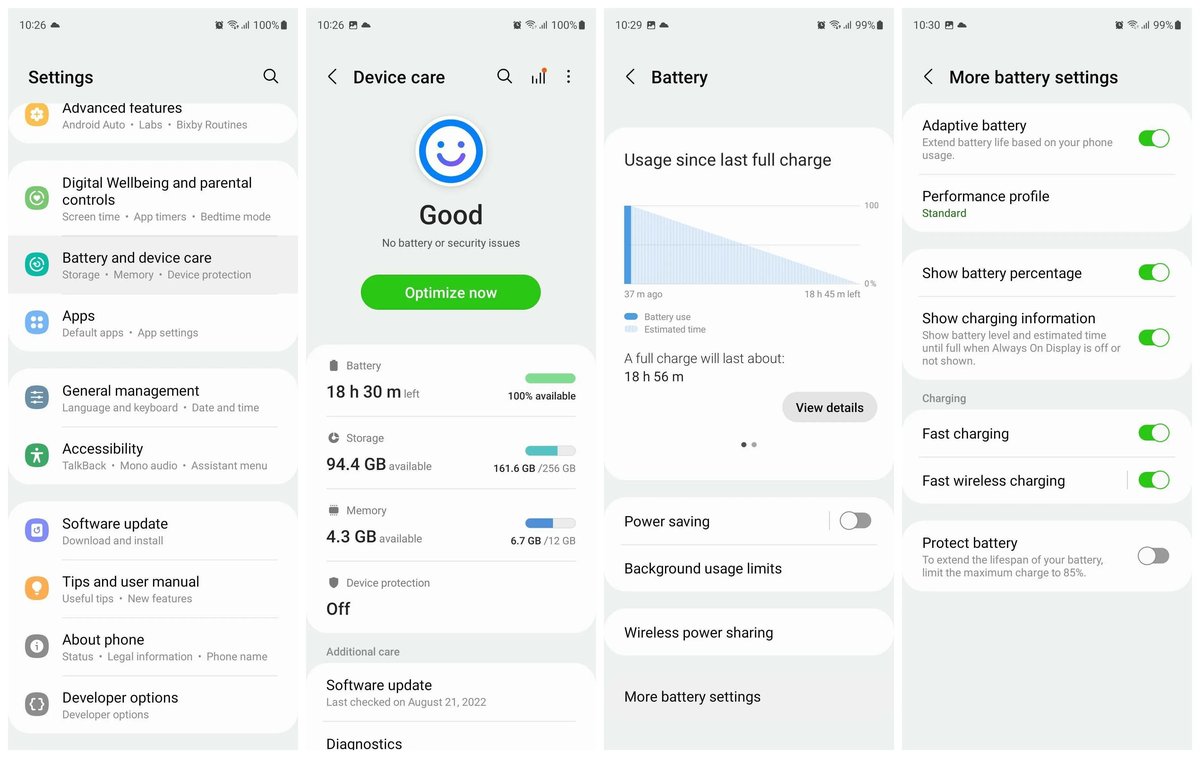
The dreaded dying battery — we’ve all been there. Your phone, laptop, or tablet, once a vibrant workhorse, now struggles to make it through the day, tethered to an outlet. It's not just an inconvenience; it’s a symptom of battery degradation, a natural process that slowly saps your device's power capacity. But what if you could significantly slow that decline, extending your device's usable life and saving money on replacements? That's precisely what Battery Life & Charging Enhancements are designed to do.
Modern devices aren't just getting smarter about what they do; they're getting smarter about how they charge. These enhancements, often bundled under names like Optimized Battery Charging or Adaptive Charging, are game-changers for anyone looking to preserve their tech investment. They work behind the scenes, learning your habits and adjusting charging patterns to keep your battery healthier for longer.
At a Glance: Key Takeaways for Smarter Battery Care
- Enable Optimized Charging: Activate features like "Optimized Battery Charging" on your smartphone, tablet, and laptop. It’s your best defense against premature battery aging.
- Avoid Constant 100% Charge: Spending too much time at a full charge puts stress on your battery. Optimized charging helps, but manually unplugging around 80-90% when feasible is even better.
- Prevent Deep Discharges: Letting your battery frequently drain to 0% is harmful. Aim to recharge when it hits 20-30%.
- Manage Heat: High temperatures are the enemy of battery health. Avoid charging or using your device in direct sunlight or hot environments.
- Use Quality Chargers: Stick to original or certified charging equipment to ensure proper voltage and current delivery.
- Update Software: Device manufacturers constantly refine battery management algorithms through software updates. Don't skip them!
- Store Smart: For long-term storage, charge your device to around 50% and keep it in a cool, dry place.
The Invisible Threat: How Your Battery Degrades Over Time
Before we dive into solutions, it’s helpful to understand the challenge. Your devices almost certainly use lithium-ion (Li-ion) or lithium-polymer (LiPo) batteries. These powerhouses are fantastic for energy density but aren't immortal. Their capacity slowly diminishes over time, a process called degradation, driven by several key factors:
High Voltage Stress: The 100% Problem
Think of your battery as a tiny reservoir. Keeping it perpetually filled to the brim (100% charge) puts its internal components under constant strain. This "high voltage stress" accelerates the chemical reactions that lead to wear and tear, reducing the battery’s ability to hold a charge over time. It's like keeping a spring fully compressed indefinitely; it eventually loses its springiness.
Heat: The Silent Killer
Your device generates heat during use, and especially during charging. When temperatures climb too high, either from external sources (like a hot car) or intensive internal processes (like gaming while charging), the delicate electrolyte inside the battery begins to break down faster. This decomposition directly reduces the battery's capacity and overall lifespan.
Charge Cycles: Every Full Circle Counts
A "charge cycle" represents one full discharge and recharge, equivalent to draining your battery from 100% to 0% and then back up. While you might not do this all at once (e.g., going from 80% to 30% then charging to 80% again uses half a cycle), every full cycle contributes to the battery's finite life. Li-ion batteries typically have hundreds of effective charge cycles before significant degradation.
Deep Discharges and Overcharging: Extreme Stressors
Completely draining your battery (deep discharge) or, conversely, continuously pushing charge into an already full battery (overcharging beyond recommended voltage) can inflict acute damage. While modern devices have safeguards against true "overcharging," maintaining 100% for long periods still contributes to high voltage stress. Deep discharges can destabilize the battery's chemistry.
Optimized Battery Charging: Your Device's Smart Guardian
Here’s where Battery Life & Charging Enhancements, specifically Optimized Battery Charging (OBC), step in as your battery's best friend. This isn't just about charging faster; it's about charging smarter.
How OBC Works its Magic
Instead of simply pumping power until your device hits 100% and then holding it there all night, OBC employs intelligent algorithms. It learns your daily routines – when you typically unplug your phone in the morning, when you finish work and move your laptop, etc.
Here's the common scenario: If you charge your device overnight, OBC might rapidly charge it to about 80%. Then, it will pause or significantly slow down the charging process. It only completes the final 20% to reach 100% shortly before it predicts you'll need to unplug and use your device.
This approach is brilliant because it dramatically reduces the time your battery spends at a stressful high-charge state. It's a proactive measure against the "100% problem" we discussed, mitigating chemical wear and extending your battery's effective lifespan.
The Undeniable Benefits of Smart Charging
Enabling Optimized Battery Charging features translates directly into tangible advantages:
- Extended Battery Lifespan: This is the big one. By reducing high-voltage stress and heat, your battery retains its maximum capacity for significantly longer, delaying that inevitable feeling of "my phone can't hold a charge anymore."
- Reduced High-Voltage Stress: As described, OBC minimizes the duration your battery sits at full capacity, directly countering a major degradation factor.
- Decreased Heat Generation: Less time spent at 100% charge, especially during trickle charging, means less overall heat generated, further protecting the battery's delicate chemistry.
- Maintained Device Value & Performance: A device with a healthy battery performs better, lasts longer on a single charge, and holds its resale value more effectively. This means you won't feel the pressure to upgrade as frequently. Curious about the latest tech trends and their impact on device longevity? It might be worth exploring whether Is iPhone 16 worth buying? based on its battery innovations.
- Seamless Integration: OBC is designed to be set-and-forget. It adapts to your habits, so you rarely notice it working, other than enjoying a longer-lasting battery.
- Environmental Sustainability: Longer-lasting batteries mean fewer battery replacements and fewer devices being prematurely retired, contributing positively to reducing electronic waste.
Activating Battery Life & Charging Enhancements on Your Devices
The good news is that most modern smartphones, tablets, and laptops come with these features built-in. Here’s how to find and enable them:
Apple Devices (iPhone, iPad, MacBook)
Apple was an early adopter of advanced battery management. For iPhones and iPads running iOS 13 or newer:
- Go to Settings.
- Tap Battery.
- Select Battery Health & Charging.
- Toggle Optimized Battery Charging to the "On" position.
For MacBooks, this feature is typically enabled by default. You can often find similar battery health settings in System Settings > Battery on macOS, where you might see options like "Optimized Battery Charging" or "Manage battery longevity."
Android Devices (Samsung, Google Pixel, OnePlus, etc.)
While the specific menu names might vary slightly between manufacturers and Android versions, the functionality is widely available:
- Open Settings.
- Search for or navigate to Battery, Device Care, or Power Management.
- Look for options such as Battery Care, Charging Optimization, Adaptive Charging, Protect Battery, or Intelligent Battery Management.
- Enable the feature.
If you can't find it, a quick search within your device's settings menu for "battery optimization" or "charging" should point you in the right direction.
Laptops (Windows & Other Brands)
Many Windows laptops, particularly those from manufacturers like Dell, HP, and Lenovo, also incorporate battery health features. These can sometimes be found within:
- Windows Settings: Search for "Battery settings."
- Manufacturer-Specific Software: Look for pre-installed applications like Dell Power Manager, Lenovo Vantage, or HP Support Assistant. These tools often allow you to manually set charge thresholds (e.g., "Always charge to 80%") or enable adaptive charging modes.
Beyond Optimization: Everyday Habits for Peak Battery Longevity
While optimized charging handles a lot of the heavy lifting, your daily habits still play a significant role. Pairing OBC with these practical tips will give your device the longest, healthiest life possible.
1. Don't Charge to 100% Unnecessarily
We know OBC helps, but if you're not planning to leave your device plugged in for an extended period (like overnight), consider unplugging it when it reaches 80-90% charge. This is especially relevant if you're working at a desk and have easy access to your charger. Every little bit of time saved from being at a full charge adds up.
2. Prevent Deep Discharges
Try to avoid letting your battery consistently drop below 20-30%. Recharge your device before it gets critically low. Think of it like running a car on fumes versus keeping the tank reasonably full; the latter is better for the engine. Consistent deep discharges stress the battery's chemistry and can diminish its capacity faster.
3. Mind the Heat: Limit High-Temperature Exposure
This cannot be stressed enough: heat is the battery's arch-nemesis.
- Avoid Direct Sunlight: Don't leave your phone on the dashboard of your car or on a sunny windowsill.
- Remove Bulky Cases While Charging: If your case traps heat, take it off during charging, especially if your device feels warm.
- Don't Charge Under Pillows/Blankets: These insulate and trap heat.
- Avoid Intensive Use While Charging: Gaming or video editing while charging generates significant heat, adding double stress to the battery.
If your device ever feels noticeably hot to the touch, let it cool down before continuing heavy use or charging.
4. Use Original or Certified Charging Equipment
It might seem tempting to grab the cheapest charger you can find, but resist the urge. Off-brand or faulty chargers can deliver inconsistent voltage or current, potentially damaging your battery or even your device's charging circuitry. Stick with:
- The charger that came with your device.
- Chargers from reputable brands that explicitly state compatibility (e.g., MFi certified for Apple, or recognized brands for Android/laptops).
This ensures your device receives power safely and efficiently.
5. Keep Software Updated
Manufacturers aren't just adding new features with software updates; they're constantly tweaking and improving backend processes, including battery management algorithms. These updates can optimize how your device uses power, how it charges, and how it reports battery health. Keeping your OS up-to-date ensures you're running the most efficient software for your battery.
6. Manage Background Apps and Screen Brightness
While not directly a charging enhancement, reducing overall power consumption means you charge less frequently, which translates to fewer charge cycles over time.
- Limit Background App Refresh: Many apps refresh data even when not in use. Review your app settings and disable background refresh for non-essential apps.
- Lower Screen Brightness: The screen is often the biggest power hog. Use adaptive brightness or manually lower it in well-lit environments.
- Use Dark Mode: On OLED screens, dark mode uses less power because black pixels are turned off entirely.
7. Store Idle Devices Properly
If you're planning to put a device away for an extended period (weeks or months), don't store it at 0% or 100% charge.
- Charge to around 50%: This is the ideal storage charge level, as it's stable and reduces stress on the battery.
- Store in a Cool, Dry Place: Avoid extreme temperatures and humidity.
- Check Periodically: If storing for several months, check the charge every few months and top it back up to 50% if it has significantly discharged.
Busting Common Battery Myths
Despite advancements, several misconceptions about battery care persist. Let's clear the air.
- Myth: You should always fully drain your battery before recharging.
- Reality: This was true for older Nickel-Cadmium (NiCad) batteries, which suffered from a "memory effect." Modern Li-ion batteries do not benefit from deep discharges; in fact, they're harmful. Frequent partial charges are perfectly fine and often preferred.
- Myth: Charging overnight will "overcharge" your battery and damage it.
- Reality: Modern devices have sophisticated charging controllers that prevent actual overcharging. Once 100% is reached, the device stops drawing power or enters a trickle charge mode. However, as we've discussed, simply sitting at 100% for extended periods still contributes to high-voltage stress, which is why Optimized Battery Charging is so valuable.
- Myth: You should never use your phone while it's charging.
- Reality: It's generally safe to use your device while it charges. The primary concern is heat. If you're performing a highly intensive task (like gaming) that causes the device to heat up significantly while charging, that combined heat can accelerate degradation. For casual use, it's fine.
The Long View: Enhancing Device Value and Our Planet
Beyond the immediate convenience, prioritizing Battery Life & Charging Enhancements has broader implications.
For your wallet, a device with a healthy battery retains its value longer. You won't face the dilemma of costly battery replacements or feel pressured to buy a new device prematurely just because the old one can't hold a charge. This means your tech investments stretch further.
Environmentally, extending the lifespan of our electronics is a powerful act of sustainability. Every device that stays out of the landfill for an extra year or two reduces the demand for new manufacturing, lowers electronic waste, and conserves valuable resources. Battery degradation is a leading cause of premature device replacement; by fighting it, we make a small but meaningful contribution to a greener future.
Your Proactive Path to Peak Battery Performance
Taking charge of your device's battery health is simpler than you might think. Start by activating the built-in Optimized Battery Charging features on all your compatible devices. Then, weave in those practical, everyday habits: be mindful of heat, avoid extremes of charge, use reliable accessories, and keep your software up to date.
These small, consistent efforts will pay dividends, ensuring your smartphones, tablets, and laptops remain reliable companions for years to come. Your battery, and your future self, will thank you.